Blog Archive

Showing posts with label Eleanor Bartram. Show all posts

Thursday, 21 April 2016

Evaluation Questions

Question One
In What Ways Does Your Media Product Use, Develop, or Challenge Forms and Conventions of Real Media Products?


Question Two
How Effective is the Combination of your Main Product and Ancillary Texts?
Part One


Part Two


Part Three


Question Three
What Have You Learned From Your Audience Feedback?


Question Four
How Did You Use Media Technologies in the Construction and Research, Planning and Evaluation Stages?


Monday, 8 February 2016

Changes to Soundtrack According to Peer Feedback

Having shown our trailer to peers we collected some feedback on which we could improve our trailers. For me, this meant making a few edits to the soundtrack. Comments that we got were that there was not enough happening and not enough defining moments within the music. 

To tackle this issue I reviewed our trailer and decided one pinnacle moment that I could define through sound was when we see the mirror being punched. I did debate using a shattering glass effect, however was not convinced it would be effective and may take away from the rest of the trailer.


Instead of this I found an Apple loop named 'Boom 3', which fitted in well with the trailer.


Upon finding the section of the music where this occurred, I added the loop in. The loop does, however, have quite a lengthy reverb which I didn't want to carry on. To lessen this I used the track tool on Garageband and pulled the ending in towards the climactic moment at the beginning of this effect. 


This was effective, however with the music over the top of it, despite altering the dynamic contrast it still became hidden. To sort this issue I remembered a common convention in soundtracks for the social realist genre, that there is normally a gap in music when some thing has happened. 


I was able to utilise this convention and did so by splitting the ongoing sounds at the region head and dragging them down to a separate track. Other than enabling me to accurate move them to where  wanted them on the track, it also allowed me to edit the dynamics. 


By editing the dynamics in the final section of music I enabled the 'Brixton Lights' sound to be the overriding sound over the 'altered state beat' and 'curiosity synth'. This also implied to an audience that a new section and atmosphere had been created.


Another thing which I decided to do with the music was to pan the different sounds. I did this so that not all the music would aurally be on top of each other, allowing an audience to clearly be able to hear the different sounds. 


Finally, I decided that I would fade out the music using Garageband, instead of doing it on Final Cut Pro. I did this using the master volume control which gave me a lot more control about when and how quickly the sound would fade.

To evaluate, I believe this new edited music has now been edited to fit with the changes suggested in our peer feedback, therefore producing a much better soundtrack than previously created.


Saturday, 6 February 2016

Poster Creation

Following our photoshoot on the 12th December for our poster and website we now had an image suitable for our poster, which we edited using Photoshop. 
Original Photo

Opening the original photo I cut around myself and the grass, then inverted this

I then tried to lessen the opaque on the wall. This didn't noticeably work and I was unsure of how to fix this until a friend with more experience on this software explained to me that if I copied the background then deleted the original background then I could separate the two parts of the image. I did this and was able to split the two sections of poster into different layers. I opaqued the wall to 50%.
Wall With Person On Separate Layer

Following this I inserted the previously saved title of 'Eating Me Up' by opening it as a separate file and dragging it to the file the poster was on. I then resized it and placed it half way down the poster, a convention in social realism films and supporting the golden rule.

Insertion of Title
The tagline we came up with was 'She's dying to be skinny', with the word 'dying' in italics to emphasise it. One problem we came to with this was that the typography this was in should match with what was used on our website. However the typography we currently had on our webpage was not available on photoshop as it was a Google font. This meant we had to find a font that was available both on Wix and Photoshop, but also fitted our genre. We settled on Courier New. I typed our tag line on and inserted it below the title in a size 12 font. 

Adding Tag-line
Following this I used the same font to add in the reviews to the right of the crouched girl. This reads 'Powerful and moving, this tackles the prominent issues of society in a beautiful way'. The words that we decided were the most important are 'powerful', 'moving' and 'beautiful', and we made these two sizes larger in font that the others. I also added 5 stars and 'The Guardian' below this, as this is commonly seen in social realism posters.

Added Review and Directors Credit
I also inserted the actors names at the top of the poster and 'Directed by Caitlyn Watson', as, again this is a common convention. 

Caitlyn made us a Pinterest styled background as is used in the website for the background to go over the wall. I added a layer at the bottom of our layers and inserted this. It was black and white, however it was originally very dark in colour and our writing was hard to read. I overcame this problem by increasing the brightness on the right hand panel, leading to the images all being visible and the text to be able to remain the same. 

With Pinterest Style Background
Finally I inserted the billings block in the grass which Stacey has made for us.


Final Poster


Thursday, 4 February 2016

Inserting reshoots to trailer

Having done our reshoots we now had to insert them, but we also had to make sure the length of these was the same as the ones previously used, as the sound had been created and inserted, meaning any difference would affect the accuracy of sound.

The first clip we did was the balloon scene with the 18 year old girl. I originally found a section of the footage from the new that we liked, and having selected this I then cropped it directly above the pre-existing footage. 

Despite believing that this would be the way to do it quickly, I then swapped the footage out and re-watched this section of the trailer and realised that this section was now very short and sandwiched between two pieces of the old footage. 

I undid all the changes I had made and dragged the old clip up. Doing this I realised the mistake that I had made was that the two effects on either side were covering some of the footage, so it was longer than I originally thought. 

To solve this problem I dragged the old footage up again and made a note of where it began, and dragged the new footage beginning to there, then copied the process again but for the end of the new footage.

Swapping in and out the new footage having done this change in approach led to the footage being cropped in the right place and being the same length as required. I did the same process for inserting the scales scene further on in the trailer.

Wednesday, 3 February 2016

Adding sound to trailer

Having emailed myself the finished sound clips I added them to our trailer in Final Cut Pro. I had emailed myself a copy of the main soundtrack with voices already on it, and one with them to insert separately. As a group we decided that it was best to use the two individual files.


Inserting the main soundtrack was relatively simple. Simply dragging the imported clip to the beginning of our trailer, then watching it over to make sure that it did all match up with what was happening on screen. Luckily it did, so I was able to insert the voice clip.
Inserting main soundtrack


This proved to need a little more care, as finding the exact place we wanted it to start so that it didn't start too abruptly, but also end within the recorded clip. We did this by zooming right in on the timeline and listening several times when we adjusted it.
Inserting voiceover

the final thing to do was fade the end of the clip so it didn't suddenly end when the titles were on. We did this by dragging the adjustment toggle on the end of the audio section on the trailer's timeline.
Fading the end of the music

Having completed this we were able to upload the trailer as a draft to Youtube.

Excited for music to now be on our trailer we watched the trailer from Youtube (we had already listened multiple times from Final Cut to make sure it was appropriate and edited correctly), however when the two pedal synthesiser notes started there was a weird demonic effect to them. Confused, we re uploaded the trailer to Youtube and listened again. The effect was still happening and this time we also realised it was also affecting the voiceover.


Going back to Final Cut I discovered that the decibel level on the sound was showing as red on some areas of the music and the voice over. I dragged it down to 7 so limited red was now showing and re uploaded the trailer to Youtube. Thankfully the effect had now stopped and the sound played as expected.

Having decreased the decibel level there is now limited red showing


Evaluation of Filming - Balloon Reshoot (30/1/16)

Having finished recording the voiceover at my house, I then drove Georgie and myself to Sutton Valence in order to reshoot the balloon scene of the 18 year old. We are reshooting this scene because on reviewing the previous scene, not all the words could be seen on the balloon.

We stopped at Georgie's house to pick up the red balloon and write our chosen word on it in black pen. The word we settled for was 'hate', as this encompassed what the character felt about herself and was short enough to fit on the balloon completely.

On arrival at the field location we encountered a very muddy field. This meant we had to very careful when going over the stile with our filming equipment. Another problem was that it was very sunny, the total opposite of the overcast conditions we had previously filmed in. We tackled this problem by recording whilst the clouds were blocking out some of the sun. We also made sure not too much glare was on the balloon.

When we first did the filming of this shot it was mid November. This meant we had to find where I had stood before, using the camera screen to line up where I was and make sure it was a smooth transition. We settled on the area that we believed to be the same area as previously used. We took one photo to make sure the quality was good and then filmed for a period of about a minute to get us a range of footage to choose from.  

Overall I think that the shoot went well and we now have improved footage from what we did originally.

Tuesday, 2 February 2016

Sound Creation

Before creating the sound I watched the trailer several times to get an idea of where changes in atmosphere occurred, and so I could include changes such as in instrument, texture or key. I then got all my equipment sorted (Garageband and midi keyboard).

  • The beginning of our trailer is meant to be happy with the main character with her friends, so I decided on something bright and fast. On apple loops I found a 12-8 acoustic strum pattern on guitar. I then approximated the section involving these to last for five of the loops, then listened back whilst watching the trailer. Luckily this lasted the exact time so I didn't need to split and delete any of the regions.


  • Now having a start I felt I had some idea of how to tackle the sound. I decided, based on research I had done into soundtracks of social realism films that a key factor in them was a solid drum beat. I don't have much experience into drum sounds, so decided that, again, using a pre existing Apple loop would be the best course of action. 
  • Using the check boxes available I selected that I needed 'beats', I wanted it to sound 'urban' (as I believed it to be appropriate to the genre), and 'electronic'. I tested some of the suggested sounds and decided that 'Altered State Beat 02.2' was the most appropriate choice that went best with our trailer. 
  • I wanted the beat to start when we move from the flashbacks of the balloons to her in the park with her friends, as this created some interest and suggested the trailer was moving forwards 
  • This sound is totally exposed after the photo is taken at the park, moving to the next title - suggesting that something has happened and putting the listener on edge.
  • Another common convention of social realism films is that synth sounds are used. I decided the trailer needed something that wasn't overpowering, but was still detectable and would allow the drum beat to take control. After testing several ideas, such as a take on Bon Ivor's 'Skinny Love' on multiple synth sounds with a slower tempo and using one crotchet instead of a quaver and two semiquavers on the same note, however this was lost and was ineffective as it wasn't recognisable in the short space of time I had in our trailer. 
  • The synth sound I found was in arpeggiator, synth bass, quantum bass, which as a throbbing quality, an effect which I have seen in  several trailers in the social realism genre. This left me able to focus on the melody. I settled on a two note rising and falling pattern, using (an octave below middle C), the B and D, which I recorded off of my midi keyboard. On Garageband I also maximised this effects volume, so although it is low it can still be heard over the drums.  
  • This sound begins at the words 'be one' in the second title, and alludes to the idea that something has gone wrong. It is a much more grounded sound than the previous acoustic strum.
  • To keep the sound moving, at the entrance of the title reading 'A Girl's Internal Struggle' I used a sound that to me evoked the idea of contemplation. It is in the minor key again, and is a synth sound from Apple loops called 'curiosity synth layers'. I aired this on top of the ongoing drum beat and two note synth. This marked a change in the atmosphere of the trailer again as we see what the character goes through (falling to the floor, throwing up, weighing herself), creating a shift in the mood that this is the result of the trolling. This sound carries through till the end of the trailer.
  • A final layer added to the soundtrack begins at the title 'best newcomer'. This is an electric guitar loop called 'Brooklyn lights rhythm guitar'. This addition suggests a very different atmosphere from previously, as we have now lost the two note pattern, and the two newest sounds are the main focus of the music, evoking the idea that its not really fast paced with action, but that it really is affecting the character and making the audience almost see her emotions portrayed by the music. This is helped by the footage as on screen we see her in an eating disorder clinic. 

Monday, 1 February 2016

Editing Website

  • Before publishing our website we did some alterations to it to ensure that it fitted on the screen of a desktop computer as well as the Macs we were using to edit it.
  • We did this by having the version we were editing open on the Mac and a version to refresh when we made an alteration on a desktop computer in the room next door.
  • When we first looked at the website on the desktop we realised that quite a lot of items on the page needed to be pulled to the left as the page needed to be scrolled horizontally across to see all the information. One example of this is with our tabs at the top of the page. To fix this I dragged the editing box they were in to make it smaller, and therefore the four tabs now fitted on the desktop screen.
  • Another problem was the stars for the reviews became very distant from each other (for example 4 together then one several spaces away). This was easy to fix by making the stars smaller.
  • One major problem was that the social media links had to be scrolled down to access. This was fixed simply by dragging them up and checking on the desktop that they were now visible.
  • Finally, before uploading it we added the newest version of the trailer so that it was up to date.

Voices Recording Evaluation (30.1.16)


  • Using my recording equipment, Georgie and I chose which words we wanted to be said over the time lapse scene. Looking at my previous blog post on suggestions for what to say we chose 'worthless', 'fat', 'ugly' and 'loser'.


  • Following this I then looked at how long the time lapse lasted for (an average of two seconds), this gave me an idea of how much I could add echo to the words and how overlapped they could be without running into the sandwiching scenes.


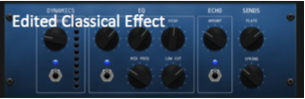
  • Testing the different vocal effects we could apply to the words Georgie and I cut down the base effects to 'classical' or 'natural', as both these use a lot of echo and reverb which was effective for how the character may hear the voices in her head


  • Using headphones (to avoid feedback) I asked Georgie to speak into the microphone and decreased the compression and increased echo and plate.


  • Using these new settings I duplicated the track three times so as to save time and avoid incorrectly editing the new tracks.


  • First we recorded Georgie saying her chosen words (fat and ugly) and then I recorded mine (loser and worthless).


  • We then cropped the beginning and end to delete any intermittent noises and slotted them over each other so they are each individually audible but follow each other


  • We then listened back whilst watching the trailer's street time lapse, and it was effective. It did sound peculiar because there is currently no other sound, however when the soundtrack is created it will hopefully blend in a lot more.


  • To evaluate, the session went well and we were able to create an effective piece of sound.


Tuesday, 26 January 2016

Reshoot Evaluation - Eye Close Up (25.1.16)

The Eye Close Up Reshoot

After school I drove myself and Georgie to her house. We found an area in her house (living room) which had good lighting. We positioned ourselves about 5 metres from a large window and, given the sunny weather, this provided us with good lighting.

We set up the tripod at the level that was at eye line. We made sure that both my eyes were in shot as this was why we needed to reshoot. We also made sure they were both in focus. 

However, once we had set this up the weather had become overcast, providing low lighting. This was unhelpful and made the shots too dark. 

We tried to overcome this problem by stacking the sofa cushions and sitting a torch on top, providing lighting, however this led to a lot of shadowing to the opposite side of my face, appearing unnatural. 

Luckily as we got the positioning of the camera sorted and had taken the first retake the weather changed again and provided the right natural lighting. 

In total we took 5 different films of the eyes to show the rest of our group and to pick the best one from.

Sunday, 3 January 2016

Music Creation Ideas

I have been unable to create any music for the trailer as yet, due to some film elements still needing completion and therefore incurring problems with timings in the music. 
However I have been able to take some ideas and experiment to see how I might use them within the trailer when able.

Idea 1

  • One idea I have had is for the first scenes with the balloons and park.
  • A repeated chord of G major played at different octaves could modulate to it's relative minor (E minor) towards the end, suggesting the move towards darker elements of the film. 
  • When the second text comes up for her at eighteen the music could 'slide' down, imitating the idea of her falling into the hands of her eating disorder  

Monday, 28 December 2015

Sound in Suffragette Trailer


  • Until 00:29 the main sound used is diegetic dialogue, this is made up mainly of women shouting 'votes for women', immediately portraying what the film will be about
  • At 00:29 we hear a bass beat which is fast paced, suggesting an idea of worry and moving the trailer forwards
  • Each time a new idea is put into the trailer, such as the suggestion to go to a meeting for the suffragettes at 00:39, we hear a singular sweeping synth sound, marking each new idea
  • At 00:54 the texture is decorated with crescendoing and and diminuendoing layered synth sounds
  • After the fight scene there is a single drum beat at 1:01 and the music changes completely. It is now made of string instruments, suggesting calmness. This however rolls into a minor chord and is gradually layered over by synth sounds as we see those against women vote and give their opinions that those fighting for the vote should be punished
  • At 1:24 the use of a bell like sound breaks the wall of the fighting that we see and introduces a new title saying 'inspired by real events'
  • Now we simply hear a pedal note which 'rolls' around the music, and at 1:31 we hear a female vocalist which is unaccompanied and uses a slight echo effect
  • Finally at 2:18 when the title of the film comes up we hear individual piano notes which rise and fall, layered with the pre existing vocals  

Friday, 18 December 2015

Website Deconstruction


Evaluation of Filming - Eating Disorder Clinic (15.12.15)

On Tuesday 15th December we shot our final scene

What went well?

  • We were able to complete our footage without being interrupted and without other problems
  • The lighting was good, leading to high quality footage being taken
  • With the addition of prop posters about eating disorders created by Georgieanne, the room began to look more like an eating disorder clinic
What didn't go so well?
  • We tried to film just a shot of the posters on the wall, however the tripod would not go high enough, and when held, was shaky
  • We had to keep the door open during filming, and as the shot we wanted was near the door we had to angle it carefully
Evaluation
  • We were happy with the outcome and will be using the footage in our film

Thursday, 17 December 2015

Editing

16/12/15


  • After Caitlyn created the typography with white outlines she sent it to me. 
  • We could not add the typography straight to the trailer, because it had no background and would appear too big. 
  • I had the idea that we could add the typography to a powerpoint document and save the slide as a picture
  • I did this, and having resized it and added the 'Festival de Cannes' logo beneath it, saved it. However, upon the first time of adding it to our trailer, we viewed it and the title appeared pixelated until the trailer finished when it would un pixelate. 
  • I then went back to the document and saved it again as a PNG file instead of JPEG, and this time it worked.

Voiceover Ideas and Effects

Ideas for 'Voices'
When deciding what Jane should hear during the town scene, we wanted it to be malicious but noticeably overly critical to show how her mind is doubting her appearance, in a way that people she had not met before wouldn't. These were some of the ideas we had:
  • 'worthless'
  • 'gross'
  • 'ugly'
  • 'outcast'
  • 'reject'
  • 'hideous'
  • 'fat'
  • 'loser'
  • 'idiot'
  • 'stupid'
  • 'creep'
  • 'loner'
  • 'weirdo'
The idea or how to record these as a voice over 'in her mind' was to use my microphone and garageband, adding reverb to the voices, increasing ambience and increasing treble, and decreasing bass.

To film this we would need a microphone, garageband, and at least two people from the group.


Wednesday, 9 December 2015

Plan of Filming - Film Poster and Website (12.12.15)

When? 

  • Saturday 12th December (10am)
Where?
  • Sutton Valence
Who?
  • Eleanor Bartram
  • Georgieanne O'Donnell
What?
  • Camera
  • Tripod
  • Balloons
  • Crockery
  • Food
Which Scenes?
  • We will be taking footage for our website time lapse, which is a take on our first scene with the balloons that have words on
  • We will also take several photos which will provide background for our film poster for which we need a brick wall background

Investigation into Production Companies Used in Social Realism


Thursday, 3 December 2015

Film Names of Dramas


Social Realism Soundtrack Research

I have conducted research into what instruments are commonly used in social realism films, and have done this by listening to Fish Tank's trailer.

Fish Tank


  • This trailer begins with a drum beat and claps. It appears to be in 4/4 time. We also hear intermittent single string synth sounds.
  • At 10 seconds we can also hear the door effect of slamming and another beat adds to the growing polyphonic texture. 
  • At 17 seconds the previous sound of a diegetic dog bark appears to have now become part of the soundtrack, in a synth form that has taken on the barks pitch
  • At 25 seconds when Mia (the main character) walks away we hear the previous created soundtrack pause and fade away. This is then replaced by a much 'fresher' sound, with an acoustic sounding synth noise, and a much regular beat.
  • At 56 seconds the music begins to gather momentum with a cymbal like sound and electric guitar pattern which are repetitive
  • At 1:08 the music again changes and is once again a very open sound, with only one instrument used in a lengthened melodic sound.
  • At 1:14 the original two beat and a clap effect comes back in, suggesting a rounding up of the trailer
  • A violin effect is used at 1:21 which is rising, suggesting the climax of the trailer is approaching
  • When each actors names are introduced we hear a singular drum beat which uses reverb 
  • As Mia is attacked in the yard at 1:40 the tempo again speeds up, suggesting the panic as is shown in the trailer
  • Finally we hear another section of music where we hear a rising scale of violin music, suggesting the climax is close. This is then cut by a singular beat, and we are left seeing Mia and only hearing the diegetic sound of her breathing.